Analyzer tool for unknown drive partitions
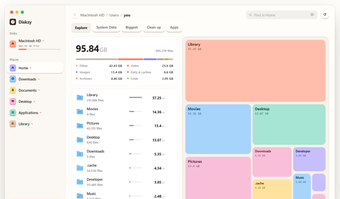
Diskzy is a premium utility application developed as a disk manager tool that specifically lets users see and understand what takes up space in their drives under the Other section, represented by the color grey. It offers detailed and helpful infographics that help make organization and management simpler and easier. A free trial is available for newcomers to check out.
Identify the Other
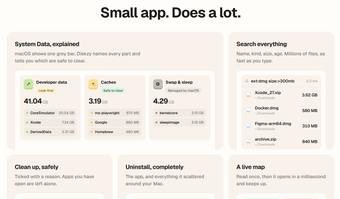
Put simply, Diskzy is a disk analyzer that actually details what the “Other” section in your Mac disk allocation screen means and what it contains. It provides a breakdown of every part, including System Data, and it lets you know if it is safe to remove or not. You can filter the information to make it easier to understand, and there’s a search function if you’re looking for something specific.
What’s more, it comes with built-in tools to clear out unnecessary data and uninstall applications completely from your computer to free up storage space for other allocations. The only thing to keep in mind is that if you’re not too tech-savvy, all the information being presented can get overwhelming and confusing. It’s really meant for power users, more than anyone else.
Pretty great
To wrap up, whether you’re trying to free up more storage space on your computer or simply curious as to what exactly is inside that greyed-out Other section on your drive, Diskzy is a pretty great tool to try out. It’s detailed, informative, and looks nice while doing it. It can be daunting, but it’s still worth a try for all it offers.